Vintage Film Camera - Digicam
- 4.8
- Rating
- 1.00M
- Installs
- Free
- Price
 Analysis by App-foxy
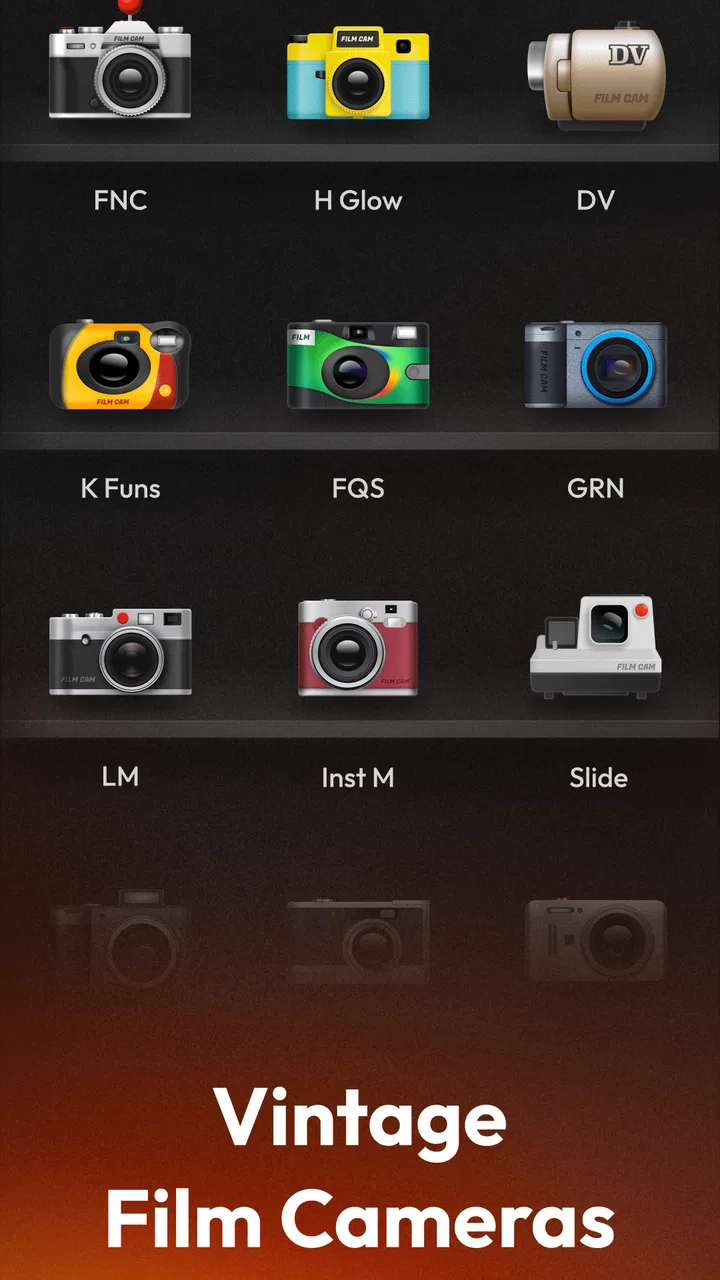
I came away from Film Camera - Vintage Camera with a fairly clear impression: it is aimed at people who want their phone photos to feel less polished and more intentional. Instead of treating photography as a race toward perfect sharpness, this free photography app leans into the mood of vintage film, retro cameras, analog-style images, and instant-photo-inspired looks. I found that approach more enjoyable for casual shooting than for serious editing, because the character is built into the moment rather than added after a long session.
That distinction matters. If you want a complete replacement for a professional camera editor, this is probably not the right direction. If you want to take an ordinary coffee, street, travel, or friend-group photo and give it a nostalgic personality quickly, the app makes much more sense. I would describe it as a creative camera first and an editing toolbox second.
How Film Camera - Vintage Camera feels in everyday use
The app comes from ZANKHANA PTE LTD and sits in the photography category. Its central idea is easy to understand: use a phone as a digital camera while borrowing the visual language of old film cameras and polaroid-style photography. I did not need to approach it like a technical project. The appeal is immediate when a normal scene looks slightly softer, warmer, moodier, or more evocative after choosing a retro treatment.
You May Also Like

 Blood Strike: 2.5 Anniversary
Blood Strike’s Loadouts Turn Every Drop Into a Tactical Gamble
A close look at Blood Strike’s custom loadouts: how fast access to signature weapons reshapes its battle royale rhythm, rewards preparation, and narrows the gap between fights.

 Pandora - Music & Podcasts
Pandora’s Music Is Easy to Start, but Harder to Recover
Pandora’s strength is its low-effort path from a seed to a station. Its weak spot is how much confidence it asks you to place in connection, setup, and quiet recovery.

 8 Ball Pool
 Is Built on Rivalries, Rematches, and Routine
A close look at the rivalries, rematches, shared routines, and unanswered safety questions that turn a quick pool match into a persistent mobile community.

 Samsung Music
’s Quiet Strength Is Playing What You Already Own
Its reach comes less from spectacle than from dependable access to a personal library. That simplicity is both the app’s strongest retention engine and its ceiling.

 AccuWeather: Weather Radar
AccuWeather Review: A Quick, Clear Forecast for Everyday Decisions
For everyday plans, the best forecast is the one you can understand quickly. AccuWeather makes rain timing, radar, and local conditions easy to act on, with a few trade-offs.

 Hill Climb Racing
Why Hill Climb Racing Still Turns Crashes Into One More Run
A tiny car, a bumpy hill and one more upgrade: Hill Climb Racing keeps resurfacing because its simple chaos makes every near-miss feel personal.
More From Our News Desk



My favorite way to use it is before taking a picture, not after. When I know I want a particular atmosphere, opening the camera with that intention helps me frame the scene differently. A plain table near a window becomes a still life. A walk through a neighborhood becomes a small visual diary. Even a quick portrait feels less like a routine phone snapshot when the chosen look encourages me to pause and consider the light.
The strongest quality is its ability to turn a quick photo into a deliberate visual choice. That sounds simple, but it changes how the app fits into daily use. The point is not merely to make an image look old. The point is to make the act of taking it feel more personal and less automatic.
A useful workflow for casual photo sessions
I recommend starting with a small subject rather than testing the app on an entire camera roll. Choose a scene with texture, such as a paper menu, a painted wall, a wooden table, or clothing with visible fabric. Those subjects reveal the effect more clearly than a flat, evenly lit surface. Once you find a look that suits the scene, take several variations from slightly different angles instead of endlessly changing the treatment.
This approach also helps avoid a common mistake with retro cameras: assuming that the most dramatic effect is always the best one. Strong color shifts can be fun for a single image, but a gentler treatment may work better for a set of photographs from the same outing. I found that consistency matters if I am making a small travel diary or sharing several images together.
For a realistic everyday example, imagine meeting a friend at a small café. The usual phone camera may produce a clean, bright image, but Film Camera - Vintage Camera encourages a different result: a close shot of the cups, a portrait beside the window, and a detail of the table or handwritten receipt. Those three images can feel connected because the camera’s retro direction gives them a shared mood. That is more interesting to me than applying unrelated filters later.
Where the retro approach works best
The vintage look is especially suitable for photographs where atmosphere matters more than accuracy. Evening streets, indoor gatherings, old buildings, handwritten notes, food on a wooden table, and candid portraits all benefit from a little visual imperfection. The style can make a quiet subject feel warmer without requiring a complicated editing routine.
It is less convincing when I need faithful color or precise detail. Product photos, documents, artwork, clothing listings, and images intended to show a landscape exactly as it appears are better handled by the standard camera or a more controlled editor. A retro treatment is a creative interpretation, so it should not be confused with a neutral record.
That is one of the app’s important trade-offs. Film Camera - Vintage Camera gives a photograph a point of view, but a point of view can also get in the way. I would not use it as my only camera for an event where I need dependable, natural-looking images. I would use it alongside the regular camera when I want a second, more expressive version of the same moment.
Why it feels different from ordinary phone filters
Most phones already include basic filters, and many social platforms offer quick visual presets. Those alternatives are convenient, especially when I am already preparing a post. The advantage here is that the vintage idea is the starting point rather than an afterthought. I can compose the image with that mood in mind, which often produces a more coherent result.
There is also a psychological difference. Editing a finished photo can become a search through endless choices. A dedicated film-style camera narrows the decision and makes the process quicker. For me, that limitation is helpful when I am walking around and do not want to spend several minutes comparing nearly identical effects.
On the other hand, a general editor remains better when I need layers of control. If I want to correct exposure, adjust a specific color, straighten a building, remove a distraction, or prepare an image for a particular format, a full editing app will usually be more capable. This app’s strength is not maximum control; it is a recognizable mood with less effort.
Small decisions that improve the results
Lighting makes a larger difference than many first-time users expect. Retro effects can add atmosphere to soft natural light, but harsh overhead lighting may become muddy or distracting. I get better results near a window, outdoors during softer parts of the day, or in scenes where shadows are part of the composition rather than an accident.
I also prefer leaving some space around the subject. The vintage-camera feeling works well when the image has context: the room around a person, the street around a bicycle, or the table surrounding a plate. Tight crops can still work, but they may make the effect look like a decoration instead of part of the photograph.
Another practical habit is to compare the treated image with the original before deciding what to keep. I do not mean choosing the technically sharper picture every time. I mean checking whether the effect supports the subject. If the texture of an old wall becomes more interesting, keep it. If a face loses natural detail or a sign becomes difficult to read, the standard camera may be the wiser choice.
The meaningful limitation: creative simplicity can become restrictive
The same simplicity that makes the app approachable may frustrate experienced photographers. I found the concept appealing because it avoids turning a quick picture into a technical assignment, but that also means it is not designed around detailed manual correction. Users who want fine control over every part of an image may quickly reach the edge of what this style of camera is meant to do.
There is another limitation in the retro concept itself: repetition. A vintage treatment is distinctive at first, but using the same visual language on every photo can make a personal feed feel predictable. I would treat this app as one tool in a broader photography routine, not as a rule that every image must look analog.
In-app purchases range from $0.99 to $19.99 per item, so the free starting point is useful for deciding whether the visual approach suits you before spending money. I would be cautious about purchasing anything immediately. First, I would take photos in several situations—bright daylight, indoor light, portraits, and close details—and decide whether the available creative direction fits my habits. A paid option is easier to justify when it solves a real workflow need rather than simply adding another novelty.
Who should install it, and who should skip it?
I think Film Camera - Vintage Camera is a good match for casual photographers who enjoy mood, memory, and visual storytelling. It should appeal to someone building a low-pressure travel diary, making a scrapbook-like collection, photographing everyday objects, or looking for a more distinctive way to capture friends. It is also a sensible choice for people who find professional editing apps intimidating or unnecessarily slow.
It may be particularly enjoyable for users who like the idea of film photography but do not want to manage physical film, scanning, or a separate camera. The app cannot replace the full experience of shooting with film, of course, but it can offer a convenient digital interpretation of that atmosphere. I see it as a bridge between a normal phone camera and a more deliberate photographic habit.
I would skip it if your priority is accurate documentation, advanced retouching, extensive manual controls, or a single app that handles every photographic task. A phone’s built-in camera is likely better for fast, reliable snapshots when you do not want a stylized result. A full editor is better for careful post-processing. The right choice depends on whether mood or control is more important for the image in front of you.
Compatibility, cost, and the practical decision
The app is free to install, has an Everyone content rating, and works on devices running Android 8.0 or later. Its current version is 1.1.2. Those details make it approachable for a broad range of Android users, although the actual experience can still vary with a phone’s camera hardware and screen. A treatment that looks subtle on one display may feel stronger on another, so I would judge the final image after viewing it outside the camera screen as well.
Its store presence is substantial, with over a million installs and a 4.7 average from around 69 thousand ratings. I take that as a sign that the basic idea connects with many people, but popularity does not remove the need to test the style against your own photography. The app is focused enough that its value depends heavily on whether you genuinely like vintage-looking images.
One practical question is whether it is suitable for sharing. For casual social posts, personal albums, and messages to friends, the concept works naturally. For professional work, client previews, online listings, or anything where colors must be trusted, I would use the regular camera and a more precise editor instead. This is not a criticism of the app so much as a reminder that a creative camera should be judged by the kind of image it intends to make.
My final recommendation
After using Film Camera - Vintage Camera as a mood-focused camera, I see its value in restraint. It does not need to compete with every advanced photo editor because its purpose is narrower: help ordinary phone photography feel more atmospheric, nostalgic, and considered. When I use it selectively, it gives familiar scenes a stronger identity and makes me pay more attention to composition.
The app is not the best choice for accurate color, deep editing, or complete photographic control. Its retro character can also become repetitive if applied without thought. Still, those limitations are manageable when I treat it as a companion to the standard camera rather than a total replacement.
I recommend it to anyone who wants a quick, expressive film-camera mood without turning photography into a technical chore. Try it first on everyday scenes, compare the results with your normal camera, and only consider the optional purchases if the style consistently improves the way you tell visual stories. For the right user, that focused purpose is exactly what makes it enjoyable.
FAQs for Vintage Film Camera - Digicam
01What features does Film Camera - Vintage Camera offer?
Film Camera - Vintage Camera provides a range of features designed to recreate the classic film photography experience. Users can choose from various vintage filters, emulate different film types, and adjust settings like exposure and contrast. The app also offers a manual focus option and a range of editing tools to enhance your photos.
02Is Film Camera - Vintage Camera free to use?
Film Camera - Vintage Camera offers a free version with basic features, allowing users to experience vintage photography without any cost. However, it also includes in-app purchases for premium features, such as additional filters and advanced editing tools. This allows users to enhance their experience and unlock more creative possibilities.
03How user-friendly is the app for beginners?
Film Camera - Vintage Camera is designed with a user-friendly interface, making it accessible for beginners and photography enthusiasts alike. The app includes a tutorial for first-time users, guiding them through its features and settings. The intuitive layout ensures that users can easily navigate and experiment with different tools without feeling overwhelmed.
04Does the app require internet access to function?
Film Camera - Vintage Camera can be used offline, allowing users to capture and edit photos without an internet connection. However, to access certain features like cloud storage, downloading additional filters, or sharing photos directly to social media, an internet connection will be necessary. Offline functionality ensures convenience in various environments.
05Are there any privacy concerns with using Film Camera - Vintage Camera?
The app takes privacy seriously, ensuring that users' photos and data are secure. It does not require unnecessary permissions, and any data collected is used in accordance with privacy policies. Users have control over sharing and storage settings, allowing them to manage their data and personal information effectively.
Pros
- Authentic vintage filters for a retro look.
- User-friendly interface for easy navigation.
- Quick sharing options to social media platforms.
- High-quality output maintaining photo resolution.
- Regular updates with new filters and features.
Cons
- Limited free filters
- many require purchase.
- Ads can interrupt editing experience.
- No option for manual camera settings.
- Occasional lag on older devices.
- Limited video editing capabilities.

Vintage Film Camera - Digicam
Gallery